How to build a low-latency live sports streaming app using APIs

September 9, 2026

12 min read

Live sports streaming is no longer just about putting a video player on a website or mobile app.
Sports fans expect the picture on their screen to stay close to what is happening on the field. A goal, wicket, touchdown, or final point that appears several seconds late can make the experience feel disconnected, especially when viewers are also following live scores, social media, or in-play betting markets.
Latency isn’t just a number. It affects how people watch, react, and stay engaged.
That makes latency a core engineering consideration when building a live sports streaming app.
A modern architecture typically combines video ingestion, encoding, packaging, CDN delivery, playback, and real-time sports data. An API can simplify how these components are controlled, but choosing the API is only the beginning.
This guide explains how low-latency streaming works, where delay comes from, which technologies matter, common implementation mistakes, and when using a live sports streaming API makes more sense than building the infrastructure yourself.
What Is Low Latency in a Live Sports Streaming API?
Latency is the time between an event happening in the real world and that event appearing on the viewer’s screen.
For example, imagine a cricket match where a batter hits a six at 8:00:00 PM. If the viewer sees it at 8:00:05 PM, the approximate glass-to-glass latency is five seconds.
The term glass-to-glass latency describes the complete journey from camera capture to rendering on the viewer’s device. Mux similarly describes live-stream latency as the time between camera capture and the moment the viewer sees the event.
Where does the delay come from?
A live video doesn’t travel directly from a camera to a viewer.
It normally passes through several stages:
Camera
   ↓
Encoder
   ↓
Ingest
   ↓
Transcoding
   ↓
Packaging
   ↓
CDN
   ↓
Player
   ↓
Viewer
Typical latency ranges
There isn’t one universal definition of “low latency.” The achievable number depends on the protocol, encoder, player, network, and architecture.
For example, Mux currently documents standard HLS latency at 20+ seconds and its low-latency mode at roughly 4–7 seconds.
Apple’s Low-Latency HLS architecture is designed to reduce live-stream delay while retaining the scalability benefits of HTTP delivery and CDNs.
So rather than asking:
“How many milliseconds does this API take?”
Ask:
“What glass-to-glass latency can the complete streaming pipeline consistently deliver under real viewing conditions?”
That is a much more useful engineering metric.
How Does a Live Sports Streaming API Work?
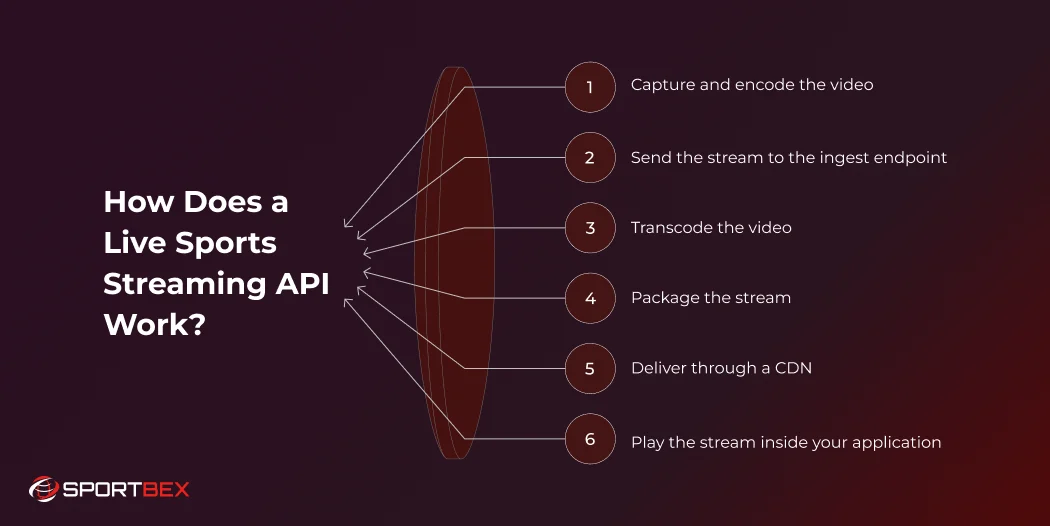
A live sports streaming API provides programmatic control over parts of the live video workflow.
Instead of manually configuring streaming infrastructure for every event, your application can use APIs to create streams, obtain credentials, configure playback, monitor stream status, and manage recordings.
A simplified workflow looks like this:
                    SPORTS DATA API
                         │
                         │ Scores / Events / Stats
                         ↓
Camera → Encoder → Ingest → Processing → LL-HLS/CDN → Player
   │                                                   │
   └───────────────────────────────────────────────────┘
                         Viewer
The video and sports data are separate pipelines, but your application can connect them at the product layer.
For example:
- Video pipeline → delivers the match.
- Sports data API → delivers score, player stats and events.
- Application backend → combines both.
- Frontend → displays video, scoreboard, markets and other UI.
This separation is important because a streaming provider doesn’t necessarily provide authoritative sports data.
1. Capture and encode the video
The process begins at the venue.
A camera captures the match and sends the feed to an encoder. The encoder compresses the video into a format suitable for transmission.
Common broadcasting workflows use protocols such as RTMP/RTMPS or SRT for ingestion.
SRT can be particularly useful when the contribution network is unreliable because it is designed to handle packet loss and network variation.
2. Send the stream to the ingest endpoint
Your streaming provider exposes an ingest endpoint.
Your encoder sends the live feed to that endpoint using credentials associated with the stream.
For example:
Encoder
   ↓
RTMPS / SRT
   ↓
Live Streaming Provider
Many API-based platforms create the ingest credentials programmatically.
Cloudflare’s current Stream architecture, for example, creates a unique live input and stream key, accepts RTMPS or SRT input, encodes the feed into multiple resolutions, and delivers playback through HLS or DASH.
3. Transcode the video
A single camera feed isn’t suitable for every viewer.
Someone watching over a strong broadband connection might receive 1080p, while someone on a weaker mobile connection may need 720p or 480p.
This is where adaptive bitrate streaming (ABR) becomes important.
The video is converted into multiple renditions:
| Rendition | Example use |
|---|---|
| 1080p | High-bandwidth connections |
| 720p | Standard HD viewing |
| 480p | Mobile or slower networks |
| 360p | Very constrained connections |
The player can switch between these versions as network conditions change.
Apple’s HLS documentation describes support for multiple bitrate streams and automatic switching based on available network bandwidth.
4. Package the stream
The processed video needs to be prepared for playback.
For large-scale web and mobile distribution, HLS is widely used because it works over standard HTTP infrastructure and CDN networks.
For low-latency streaming, Low-Latency HLS (LL-HLS) reduces the amount of media the player needs to wait for before continuing playback.
Apple’s LL-HLS implementation introduces mechanisms such as partial media segments, playlist delta updates, blocking playlist reloads, preload hints and rendition reports.
5. Deliver through a CDN
The stream is then distributed through a CDN.
Instead of every viewer connecting directly to your origin infrastructure, viewers retrieve content from geographically distributed edge locations.
This matters when a major sports event suddenly attracts a large audience.
The CDN handles much of the distribution workload while your application manages the user experience and business logic.
6. Play the stream inside your application
The final step is playback.
Your application receives a playback URL or playback identifier and passes it to a compatible player.
The frontend can then combine the video with other application components:
┌──────────────────────────────────────┐
│             LIVE MATCH               │
│                                      │
│          Video Player                │
│                                      │
├──────────────────────────────────────┤
│ India  142/4     Australia 141/8     │
│                                      │
│ CRR 8.2     RRR 8.4                  │
├──────────────────────────────────────┤
│ Live Events │ Stats │ Commentary     │
└──────────────────────────────────────┘
That is where a streaming API becomes more than a video delivery tool.
It becomes part of the application architecture.
Why Low Latency Still Feels Hard in 2026
The technology has improved significantly, but low latency is still a systems problem.
The biggest mistake is treating latency as a single setting.
It isn’t.
Latency is cumulative
Consider a simplified pipeline:
| Stage | Potential latency source |
|---|---|
| Camera | Capture and buffering |
| Encoder | Frame processing and GOP structure |
| Contribution network | Transmission and packet recovery |
| Transcoding | Processing delay |
| Packaging | Segment/part creation |
| CDN | Distribution and cache behavior |
| Player | Startup buffer and playback logic |
| Viewer network | Bandwidth and congestion |
The latency-quality trade-off
Lower latency generally gives the player less room to absorb network problems.
That creates a practical trade-off:
Lower latency
↓
Less playback buffer
↓
Less tolerance for network variation
↓
Higher risk of rebuffering
A sports platform therefore shouldn’t optimize for the smallest theoretical latency number.
It should optimize for the lowest latency that remains stable for its target audience.
This is particularly important for mobile audiences, travelers and viewers using inconsistent networks.
Player configuration matters
The same stream can behave differently in different players.
Player startup settings, buffer management, supported protocols, device capabilities and network conditions can all influence the actual experience.
Cloudflare explicitly notes that enabling LL-HLS can reduce glass-to-glass latency at the cost of reduced player compatibility.
That makes player testing an essential part of your streaming architecture—not a frontend task to leave until the end.
1. Focusing only on API response time
A fast REST API doesn’t automatically mean fast video.
Your application might create a stream in milliseconds while the player remains 10 or 20 seconds behind the live action.
Better approach: measure the complete glass-to-glass path.
2. Using standard HLS when the product requires near-live interaction
Traditional HLS prioritizes reliable delivery and scalability, but it can introduce substantial delay.
Mux documents standard HLS streams at more than 20 seconds in its current documentation, compared with around 4–7 seconds for its low-latency mode.
If your use case involves live betting, interactive commentary or synchronized match events, standard HLS may not provide the experience you want.
3. Making segments too large
Longer segments give the player more data to buffer, but they also increase latency.
For low-latency workflows, segment and part duration needs to be considered alongside encoder GOP configuration.
AWS recommends one-second HLS segments for certain low-latency MediaLive workflows and notes that GOP size affects latency because segment length is related to GOP structure.
4. Ignoring keyframe intervals
Keyframes are important reference points that allow video decoding to begin efficiently.
An inconsistent or poorly selected keyframe interval can cause latency and playback problems.
Cloudflare currently recommends a consistent keyframe interval and specifically calls out a 2–8 second range when troubleshooting live-stream latency. Its LL-HLS guidance recommends a 2–4 second GOP for the lowest latency.
The exact configuration should match your streaming provider and delivery architecture.
5. Forgetting about B-frames
B-frames can improve compression efficiency, but they can introduce complications for latency-sensitive workflows.
For its LL-HLS pipeline, Cloudflare recommends turning B-frames off or setting them to zero because they can cause jitter and buffering delays.
Don’t blindly copy encoder settings from a VOD workflow into a low-latency live workflow.
6. Forgetting about B-frames
Your streaming API credentials should not be exposed in browser or mobile application code.
A safer architecture is:
Frontend
   ↓
Your Backend
   ↓
Live Streaming API
   ↓
Stream Credentials
The backend creates or manages streams and returns only the information the client actually needs.
For private content, also consider signed playback URLs, access controls, token expiration and origin restrictions.
Live Sports Streaming API Use Cases
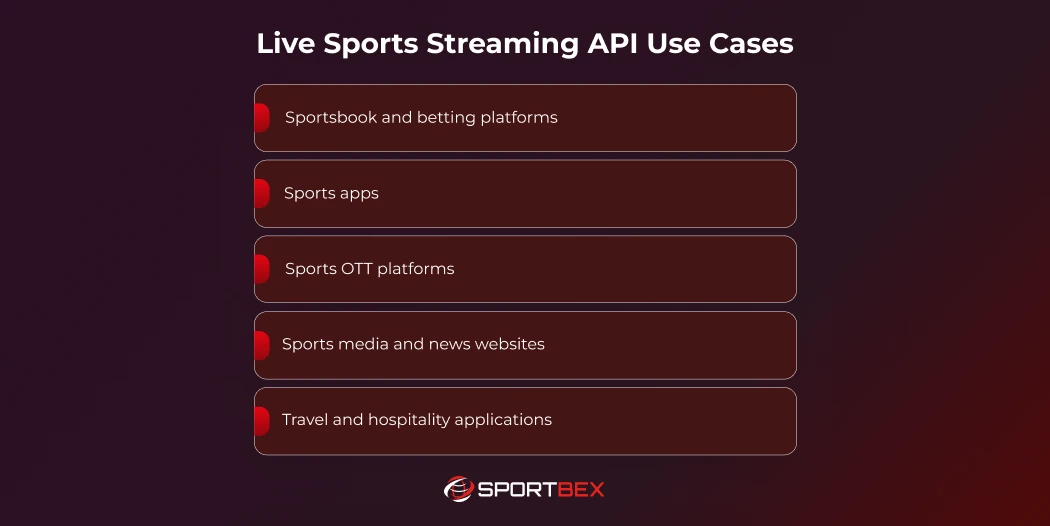
A low-latency streaming architecture supports sportsbooks, sports apps, OTT platforms, and sports media websites, with the ideal setup depending on viewer interaction, acceptable delay, integration with real-time data, scalability, playback compatibility, content rights, and reliability.
Sportsbook and betting platforms
For sportsbook operators, latency can directly affect the relationship between what users see and what they can do.
A platform might display:
- Live match video
- Current score
- Betting markets
- Live In-play odds
- Match events
- Statistics
The critical requirement is keeping these components logically synchronized.
A five-second video delay combined with a much faster odds feed can create a confusing experience and may require careful product and risk controls.
Sports apps
A dedicated sports app can combine video with:
- Live scores
- Player statistics
- Match commentary
- Team information
- Notifications
- Highlights
- Personalized feeds
This is particularly useful when users don’t want to switch between multiple applications while watching a match.
Sports OTT platforms
OTT businesses can use streaming infrastructure to distribute live matches directly through web, mobile and connected-TV applications.
The underlying architecture normally includes:
Content Source
     ↓
Live Ingest
     ↓
Encoding
     ↓
Packaging
     ↓
CDN
     ↓
OTT Applications
If you’re evaluating the wider technology stack, our guide to live streaming solutions for building a sports OTT platform covers the infrastructure and platform considerations in more detail.
Sports media and news websites
Sports publishers can embed live video alongside editorial content.
For example:
LIVE MATCH
───────────────
Video
───────────────
Live score
Match timeline
News updates
Player statistics
This creates a more complete experience than publishing a video player alone.
If you’re adding an existing broadcast to a website, our guide on integrating a live sports stream into your website covers the implementation considerations.
Travel and hospitality applications
Hotels, airports, sports bars and travel-focused applications can also use live sports video.
For example, a travel app could show local sports events or licensed broadcasts while providing venue information and schedules.
For these products, device compatibility and regional content rights can be as important as latency.
Live Sports Streaming API vs. Building Streaming Infrastructure In-House
The biggest architectural decision is often whether to use a managed API or build the streaming stack internally.
There is no universal answer.
| Factor | Streaming API | In-house infrastructure |
|---|---|---|
| Initial development | Faster | Slower |
| Encoding infrastructure | Managed | Build/manage |
| CDN integration | Usually managed | Your responsibility |
| Scaling | Provider handles much of it | Your engineering team |
| Customization | Depends on provider | Maximum control |
| Operations | Lower | Higher |
| Infrastructure expertise | Lower requirement | High requirement |
| Vendor dependency | Higher | Lower |
| Cost model | Usage/platform based | Infrastructure + engineering |
| Time to market | Usually shorter | Usually longer |
When an API makes sense
A managed live sports streaming API is usually attractive when your main product isn’t video infrastructure.
For example:
A sportsbook wants to add live video to its betting interface.
The business’s differentiation is likely betting UX, markets, risk management, payments and customer acquisition—not maintaining encoders and CDN infrastructure.
In that situation, using an API can let the development team focus on the product.
When in-house infrastructure makes sense
Building internally can make sense when:
- Streaming is the company’s core technology.
- You need unusual processing requirements.
- You have a large dedicated video engineering team.
- You require deep control over every infrastructure layer.
- Your scale makes infrastructure economics favorable.
- Regulatory or contractual requirements demand specific architecture.
The important comparison isn’t simply API cost versus server cost.
You should also consider:
Engineering + operations + monitoring + scaling + incident response + infrastructure + vendor integrations.
Built a Low-Latency Live App with Sportbex
For teams that want to add live sports video without building the entire streaming infrastructure themselves, Sportbex provides a live sports streaming solution designed for sports applications, sportsbooks and sports media products.
The important architectural advantage is that your application can focus on the user experience while the streaming infrastructure handles the underlying video delivery workflow.
A typical implementation can look like:
Sports Event
     │
     ├──────────────→ Sports Data API
     │                  │
     │                  ├─ Scores
     │                  ├─ Events
     │                  ├─ Stats
     │                  └─ Odds
     │
     └──────────────→ Live Streaming
                        │
                        ├─ Video Ingest
                        ├─ Processing
                        ├─ Low-Latency Delivery
                        └─ Playback
                                │
                                ↓
                         Sports Application
This architecture is useful when video is an important product feature but maintaining video infrastructure isn’t your core business.
Sportbex’s live sports streaming offering is positioned for sportsbooks, fantasy sports platforms and sports media applications.
Conclusion
Building a low-latency live sports streaming app is not simply a matter of selecting a fast API.
The viewer experience depends on the complete chain—from camera capture and encoder settings to packaging, CDN delivery and player behavior.
For most sports applications, a practical architecture combines a managed live sports streaming API with a separate sports data API. The streaming system handles video delivery while the sports data layer provides scores, events, statistics and other real-time information.
The most important lesson is to optimize the complete system rather than one component.
Measure glass-to-glass latency. Tune the encoder. Use the right delivery protocol. Test real networks. Keep video and sports data synchronized. Protect your streams.
And before building streaming infrastructure from scratch, calculate the operational cost of running it yourself. For many sports startups, sportsbooks and application teams, an API-based approach can reduce infrastructure work and allow engineering resources to stay focused on the product users actually interact with.
Recent Blog


Cricket API Uptime & Availability: What Developers Should Know
August 27, 2026
 13 min
How to Scale Your Sportsbook with a Reliable Tennis Odds API
August 11, 2026
9 min
Stream Live Sports with Ultra-Low Latency and Full HD Quality
API Free Trial